






Krita is a professional-grade digital art software that has gained immense popularity among artists around the world. Designed primarily for painters, illustrators, and concept artists, Krita offers a powerful set of tools while remaining completely free and open source. For artists who want high-quality digital painting software without expensive subscriptions, Krita has become a trusted and creative companion.
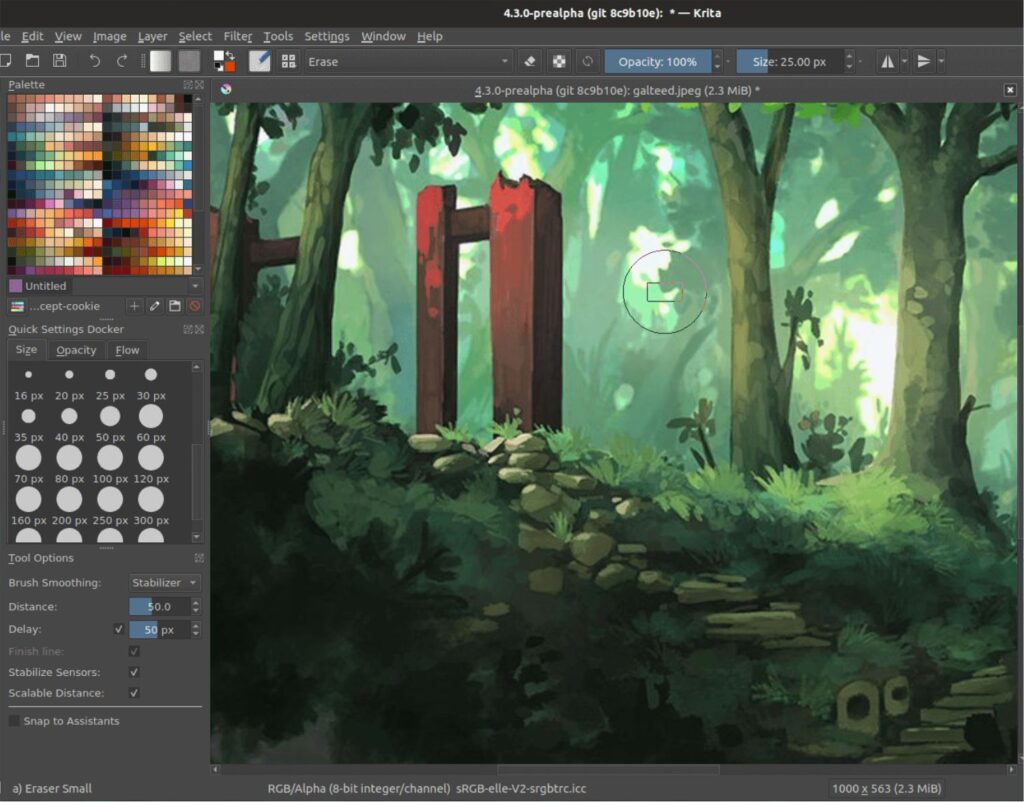
One of Krita’s greatest strengths is its focus on natural painting. The software provides an extensive collection of brushes that closely mimic real-world tools such as pencils, inks, watercolors, charcoal, and oil paints. Artists can customize brushes in great detail, adjusting texture, flow, opacity, and pressure sensitivity. This makes Krita especially appealing to those who want their digital artwork to feel organic and expressive rather than mechanical.
The user interface of Krita is built with artists in mind. It is clean, customizable, and efficient, allowing creators to arrange panels, toolbars, and shortcuts according to their workflow. Krita also supports high-resolution canvases, making it suitable for professional illustrations, concept art, and print-ready designs. Whether working on a small sketch or a detailed painting, artists can rely on Krita to handle complex projects smoothly.
Krita supports layers, blending modes, masks, and advanced color management, giving artists full control over their artwork. Features such as layer styles, symmetry tools, and perspective assistants help speed up the creative process and improve accuracy. These tools are particularly useful for character design, environment art, and comic creation, where precision and consistency matter.
Another standout feature of Krita is its strong support for drawing tablets. The software works seamlessly with pen pressure, tilt, and rotation, allowing artists to draw naturally and comfortably. This makes Krita a favorite among digital painters and illustrators who use graphic tablets or pen displays. The software is available on multiple platforms, including Windows, macOS, and Linux, ensuring accessibility for a wide range of users.
Krita also offers animation tools, allowing artists to create frame-by-frame animations directly within the software. This feature has made it popular among animators and storytellers who want to experiment with motion alongside static art. Combined with onion skinning and timeline controls, Krita provides a solid foundation for 2D animation projects.
Beyond its features, Krita is supported by a passionate global community. Artists share tutorials, brushes, and resources, helping newcomers learn and grow. Regular updates introduce new tools, performance improvements, and bug fixes, ensuring that Krita continues to evolve alongside the needs of artists.
In conclusion, Krita is more than just a free alternative to paid software. It is a professional, artist-centered platform that empowers creativity without financial barriers. For beginners and professionals alike, Krita proves that powerful digital art tools can be accessible, flexible, and inspiring.